Calculate restaurant labour cost percentage with consistent inputs
Work through 3,000 divided by 12,000, then check cost inclusions, reporting dates, owner labour and changes in sales.

To calculate restaurant labour cost percentage, divide labour cost by sales for the same period, then multiply by 100. For example, 3,000 divided by 12,000 is 25%.
The useful part comes before the division: deciding what those two amounts include. Give your bookkeeper and the manager reviewing the week the same definition, so a change in the percentage means more than a change in the worksheet.
Define the cost numerator and sales denominator
Use this formula:
Labour cost percentage = labour cost ÷ sales × 100
For a practical weekly management worksheet, start with these two totals. Agree the accounting treatment with your bookkeeper before comparing them with your financial reports or another venue’s figures.
- Labour cost: gross employee wages and salaries attributable to the week, plus the employer costs you have agreed to include. List those extra costs separately: employer taxes, superannuation or retirement contributions, benefits and any agency labour. Do not add an amount again if it is already in another line.
- Sales: the week’s net sales on an agreed basis. For this worksheet, use sales after discounts and refunds, excluding sales tax or GST collected and pass-through tips. Ask your bookkeeper to identify the right report and how your venue treats service charges, delivery-platform fees and other adjustments. Don’t substitute bank deposits or include money received for future events simply because it arrived that week.
Keep the first line at gross pay, not take-home pay. In the US, the IRS distinguishes tax withheld from employees’ wages from taxes paid by employers. Ask payroll for the employer-cost amounts; adding every payroll tax remittance on top of gross wages can count employee withholding twice. Check state and local employer costs separately too.
For Australian venues, ask the person responsible for payroll to confirm superannuation and other employer costs for the reporting period. Use the ATO’s current super guidance, rather than copying a rate or payment timetable from an old spreadsheet. Neither country’s employer-cost list should be treated as the other’s.
Make owner labour visible
Write down whether an owner or working manager’s pay is included. If a salary is already in the cost total, don’t add it again under “management”.
If the owner works shifts without a wage in the worksheet, record those hours beside the result. You can also make a separate planning estimate of what replacing that work would cost. Label it as an estimate—not a payroll expense or an adjustment to the accounts. Owner compensation needs the right treatment for the business structure; the IRS’s paying-yourself guidance explains why US owners cannot assume one arrangement fits every business.
Match periods and document inclusions
Choose one period, such as Monday through Sunday, and put its dates above both totals. Ask payroll for costs attributable to that work period, even if payday falls in a different week. Ask your bookkeeper how to allocate salaries and employer costs that arrive monthly or on another cycle. Use the same method each week.
Keep actual results separate from forecasts. Actual weekly labour cost divided by actual weekly sales answers a different question from planned roster cost divided by forecast sales. Label each clearly; don’t combine actual costs with forecast sales and present the result as the finished week.
You can keep the definition in a short note:
Week: [start date–end date]. Venue: [name]. Actual labour cost: [amount], including [cost lines]. Actual net sales: [amount], from [report and filters]. Owner work: [included pay, or hours shown separately]. Missing items: [item, person checking it and due date]. Prepared by: [name].
Give missing inputs a name, not a zero. If agency invoices or employer costs are still outstanding, mark the result provisional and ask the bookkeeper to update it before you compare weeks. A new cost definition also needs a note; restate the earlier week on the same basis where possible.
Work the calculation and check arithmetic
Suppose a small cafe is reviewing one completed Monday-to-Sunday week. The manager records the week’s costs and sales in the cafe’s local currency.
The manager and bookkeeper have agreed these non-overlapping cost lines:
- Gross employee wages and salaries for the week: 2,400.
- Employer taxes and contributions allocated to the week: 300.
- Employer-funded benefits allocated to the week, not already in the first two lines: 180.
- Agency labour attributable to the week, not included above: 120.
The total is 2,400 + 300 + 180 + 120 = 3,000. The agreed sales report shows 12,000 for that same week, using the net-sales definition above.
3,000 ÷ 12,000 × 100 = 25%
That means the included labour costs equal 25% of the included sales. It does not mean the cafe has a 75% profit margin: food, rent, utilities and other costs are outside this calculation.
Now check what the figure leaves out. Suppose the owner also worked 20 hours without a wage in these totals. For a separate replacement-cost scenario, the manager chooses an illustrative all-in estimate of 30 per hour. That adds 20 × 30 = 600, making the planning comparison 3,600 ÷ 12,000 × 100 = 30%. The recorded-cost result remains 25%. Neither the chosen rate nor the extra 600 is a payroll instruction.
Finally, hold recorded cost at 3,000 and change sales to 10,000. The result becomes 30%, with no increase in the cost numerator. That is why the manager needs both amounts beside the percentage—not just a red or green cell.
Interpret variation without universal targets
Don’t use this example’s 25% as a healthy benchmark. Compare your own results only after checking the reporting period, cost inclusions and sales basis. If you use an industry benchmark, first find out what its labour and sales totals include.
When the percentage rises, the manager and bookkeeper can work through three questions:
- Did the inputs change? Look for a late invoice, a payroll correction, a different sales filter or a cost newly included this week. Correct the comparison before judging the operation.
- Did cost or sales move? Compare the two amounts separately. In the example, lower sales alone changed the result from 25% to 30%.
- What work explains the difference? Check paid preparation, closing, onboarding, training and owner cover alongside service. Ask the shift lead what changed before assuming an apparently quiet interval was spare capacity.
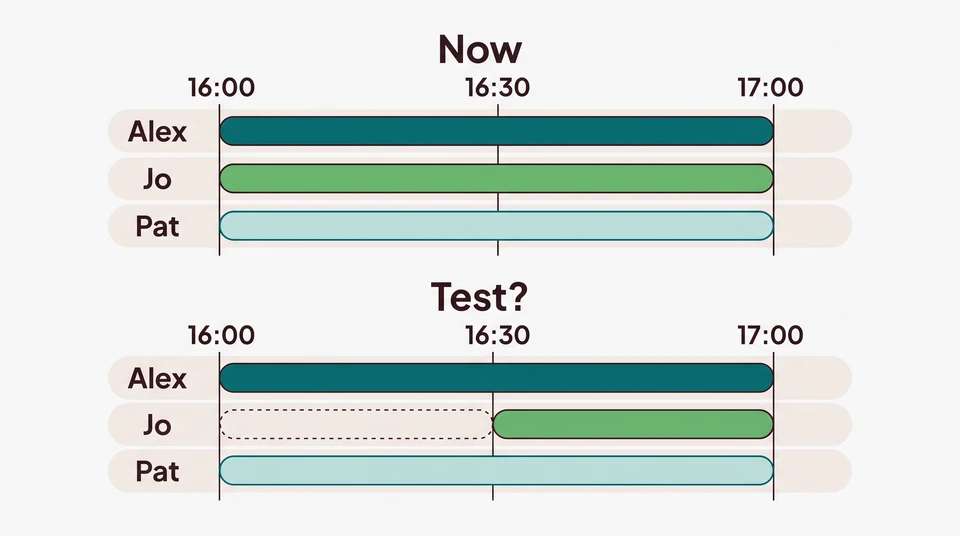
A ratio is a prompt to investigate, not an instruction to remove a shift. For a proposed start-time change, use a separate work-and-coverage comparison. For the next week’s assignments, build the roster around the work that needs covering. Keep those decisions separate from calculating this week’s result.
Start with your existing spreadsheet or a paper worksheet; you don’t need new software to do the calculation. If you also want to sketch next week’s shifts, CrewCentral’s free Schedule Maker is manual and browser-local, with no account or email needed to start. It isn’t a payroll system or a labour-cost calculator, and it doesn’t provide AI generation or shared cloud storage.
For a connected team workspace, explore CrewCentral Scheduling. Hiring, onboarding, training and scheduling share team context. Account-based AI can help prepare a roster draft; a manager reviews and adjusts it before publishing. Keep the labour-cost calculation with your payroll and sales records, then bring what you learn into the next planning conversation.