Find the right people, get them ready, and put them on the schedule. CrewCentral
gives managers of shift-based teams one place to keep the work moving.
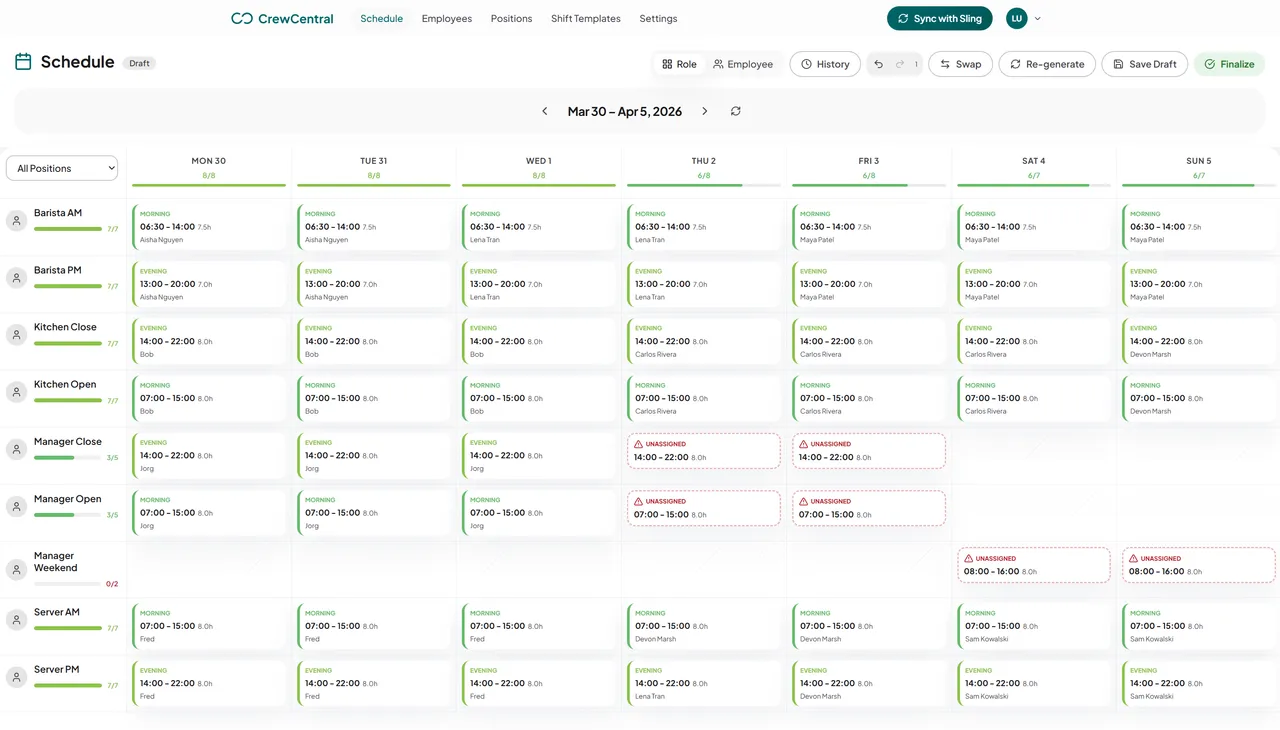
Recurring availability and time-off inputs feed the draft before a manager starts moving shifts around, so coverage gaps show up during planning instead of on the day.
CrewCentral brings scheduling, onboarding, training, and hiring into one team workspace. Managers can plan shifts around roles and availability, see new hire and training progress, and keep hiring tied to the roles they need to fill.
Can I try scheduling without signing up?
Yes. The free schedule maker works in your browser with no account or email. Build an editable week for a restaurant, cafe, or bar, then print, export, or share it.
How is CrewCentral different from a spreadsheet?
A spreadsheet shows the shifts. CrewCentral also brings roles, shift templates, availability, onboarding progress, and training readiness into the team workspace so managers have more context when they plan.
How do hiring, onboarding, and training work together?
Candidate details can carry into onboarding, and onboarding and training progress sit with the worker profile. That gives managers a clearer view of who is ready when they build the schedule.
Does CrewCentral handle payroll or labor law compliance?
CrewCentral focuses on scheduling, onboarding, training, and hiring. It does not process payroll or interpret local labor rules for you.
How do I get access to the full team workspace?
Choose Get started for free to create an account for your team, or contact us if you would like help setting up. Hiring, onboarding, training, and scheduling share the same team workspace.
Bring your crew together
Ready to make the next shift easier?
Get hiring, onboarding, training, and scheduling working together for your team.
Create a free account to get started.