Hire

Hiring

Onboard

Onboarding

Train

Training

Schedule

Scheduling

Built for

Shift-based teams RestaurantsCafesBars

Resources

Learn

GuidesBlog

Company

Product overview About Contact
Get started for free Login
For shift-based teams of any size

Great shifts start with a ready team.

Hire, onboard, train, and schedule in one place.
Spend less time on details, more time with your team.

Start with a schedule in your browser. No account needed.

CrewCentral schedule
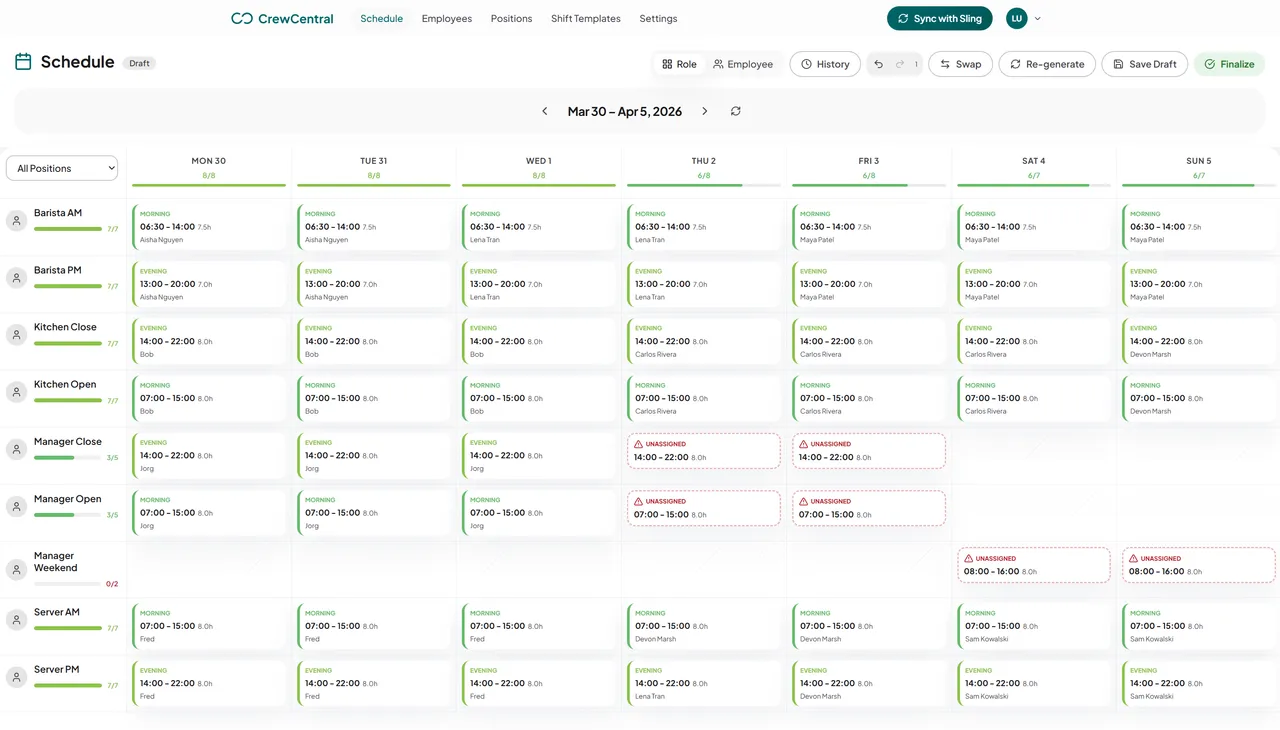
CrewCentral scheduling workspace showing a weekly shift schedule organized by role
The CrewCentral platform

One team. Four connected steps.

From finding someone new to planning next week's shifts, CrewCentral keeps hiring, onboarding, training, and scheduling connected for teams of any size.

01 / 04   Hiring

Find the right people for the roles you need

Keep candidates and open roles organized, then carry the right person forward into onboarding.

Explore hiring
With CrewCentral
  • Team and role context for hiring
  • Candidate profile information tied to real service roles
  • Pipeline visibility for managers

Keep the momentum going after a candidate says yes.
02 / 04   Onboarding

Give every new hire a clear start

Bring new hire details, team tasks, and progress together so everyone knows what needs to happen before the first shift.

Explore onboarding
With CrewCentral
  • Worker profile setup for role, contact, and experience context
  • Team-specific onboarding tasks and checklists
  • Manager visibility into onboarding progress per worker

Help new team members get ready for their first shift.

03 / 04   Training

Know who is ready for each role

Give each role clear steps and track progress as your team learns. Managers can see readiness when they plan the week.

Explore training
With CrewCentral
  • Role-based training steps for shift-based teams
  • Manager-visible progress by worker and by role
  • Readiness context that can inform scheduling decisions

Put training progress to work when you plan the schedule.

04 / 04   Scheduling

Build a better week for your whole team

Bring roles, shift patterns, and availability into one plan. Review the draft, make your changes, and publish when the week is ready.

Explore scheduling
CrewCentral scheduling workspace showing weekly shifts arranged by role
Try it for yourself

Need a schedule this week?

Make an editable restaurant, cafe, or bar schedule in your browser. Print it, export it, or reuse it next week. No signup required.

1

Pick the venue and the week

Choose restaurant, cafe, or bar, pick the week, add your team size, and choose the shift pattern that fits.

2

Generate and edit the draft

You get a filled weekly grid instead of a blank spreadsheet. Every staff label, role, and shift cell is editable, and you can add rows as you go.

3

Print, export, or share it

Print the week, download it as CSV, or copy a private link. Reuse next week carries the same shape forward so you are not starting over each Sunday.

Next week, editable: weekly shifts organized by role in the CrewCentral scheduling workspace

What you get

  • Free to use with no account and no email required
  • Restaurant, cafe, and bar starting templates
  • Edit names, roles, and shifts and see your weekly totals
  • Reuse next week from the current draft
  • Print, CSV export, and a private share link
  • Drafts autosave in your own browser
Questions

Frequently asked questions

What can I do with CrewCentral?

CrewCentral brings scheduling, onboarding, training, and hiring into one team workspace. Managers can plan shifts around roles and availability, see new hire and training progress, and keep hiring tied to the roles they need to fill.

Can I try scheduling without signing up?

Yes. The free schedule maker works in your browser with no account or email. Build an editable week for a restaurant, cafe, or bar, then print, export, or share it.

How is CrewCentral different from a spreadsheet?

A spreadsheet shows the shifts. CrewCentral also brings roles, shift templates, availability, onboarding progress, and training readiness into the team workspace so managers have more context when they plan.

How do hiring, onboarding, and training work together?

Candidate details can carry into onboarding, and onboarding and training progress sit with the worker profile. That gives managers a clearer view of who is ready when they build the schedule.

Does CrewCentral handle payroll or labor law compliance?

CrewCentral focuses on scheduling, onboarding, training, and hiring. It does not process payroll or interpret local labor rules for you.

How do I get access to the full team workspace?

Choose Create your workspace to get started, or contact us if you would like help setting up your team. You can use the free restaurant schedule maker before either step.

Bring your crew together

Ready to make the next shift easier?

Get hiring, onboarding, training, and scheduling working together for your team. Start a workspace or try a free schedule first.

Scheduling, onboarding, training, and hiring are free to use right now. We’ll give notice before pricing changes.