Restaurant manager responsibilities that need a clear owner
Agree what the shift manager can decide, what stays with the owner and what happens when the owner is unavailable.
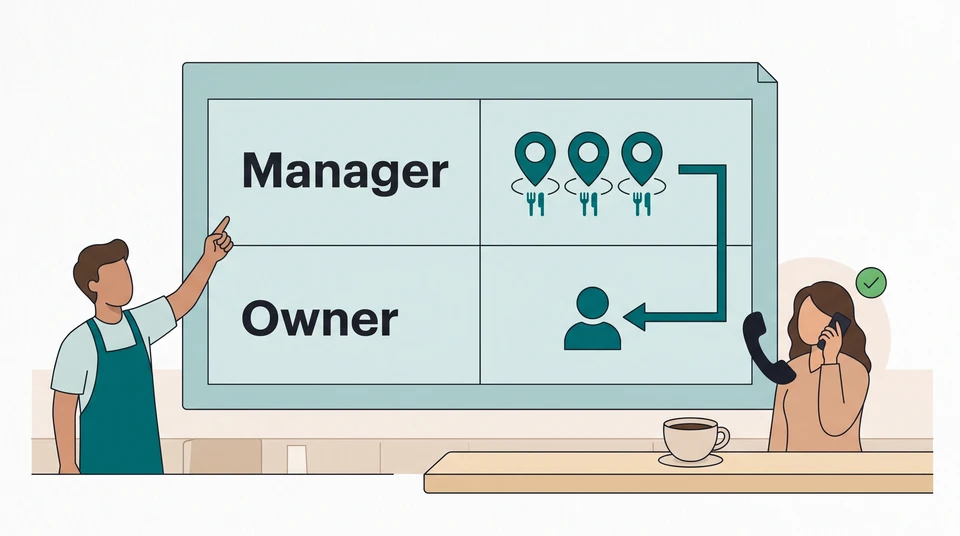
Before your next service, agree which decisions the shift manager can make, which come back to the owner and who answers if the owner is unavailable. Put those limits beside the duties—not in a separate conversation everyone has to remember.
Start with one page in your existing shift notes. Give each responsibility a decision-maker, a limit and a backup contact. You do not need a new tool to do this.
Separate owner and shift-manager decisions
Restaurant manager duties and responsibilities cover more than serving guests. Australia’s occupation description for cafe or restaurant managers includes daily operations, staff supervision, hiring, training, inventory and budgets. Use those areas to start a conversation about your venue, not to assume every shift manager has permission to make every decision.
Write the difference between doing the work and approving a change. A manager might identify a staffing gap and propose cover while the owner decides whether to add another person. If you want the manager to approve that change instead, agree the circumstances and limits beforehand.
Try this sentence for each duty:
You own this decision within these limits. Ask this person when the limit is reached. If they are unavailable, follow this agreed next step.
Keep pay decisions, employment terms and unfamiliar legal or safety questions out of an improvised service decision. Name the person who handles them through your venue’s separate procedures. This operational map is not a job classification or a substitute for the requirements that apply where you operate. US owners can use the same planning format, but the Australian occupation description does not establish US duties or authority.
Assign pre-service responsibilities
Imagine a small Australian restaurant where owner Alex works off-site during dinner and shift manager Jo leads service. They agree the following example map before the shift. These are their venue’s arrangements, not rules for every restaurant.
Service stations — Jo decides
Jo assigns the people already on shift to work they are ready to cover. Before briefing the team, Jo checks attendance, station experience and tonight’s bookings with the kitchen lead. Adding another person to the shift is outside this permission.
Extra staffing — Alex decides
Jo checks the gap and proposes an option. Alex approves or declines the extra staffing after checking the relevant arrangements. Jo does not tell a potential cover worker to come in before that decision and the person’s availability are confirmed.
If Alex is unavailable — Chris is the backup
Chris, the co-owner, has agreed to be reachable by phone during this service and can make the same extra-staffing decision. If neither owner answers, Jo follows the temporary service adjustment they agreed before opening: pause seating new tables, update waiting guests and review the queue with the kitchen lead. No reply is not permission to add someone.
Unfinished decisions — Alex owns follow-up
Jo records the decision, what happened and anything still open. Alex reviews the note before the next dinner service and confirms any changed limit with Jo.
Replace Alex, Jo and Chris with your actual people. One person may own several responsibilities; what matters is that the team knows who is deciding tonight. If your proposed backup cannot take calls, choose someone else or agree a workable fallback before service.
At the briefing, Jo tells the team who owns station changes and where staffing questions go. Jo asks each station lead to confirm their assignment and flag any work they cannot cover. An acknowledgement means the instruction was received—not that a skill or staffing gap has disappeared.
Define service escalation
Suppose a floor team member cannot attend. Jo checks which work is uncovered, who is already available on the floor and whether moving someone would leave another station without support. Jo does not treat a name on an old roster as available cover.
In this example, moving the existing team will not cover the gap. Jo calls Alex with a specific request:
We’re missing floor cover for dinner. The people here cannot cover both the entrance and their sections. I recommend contacting Casey for the floor role, subject to confirming availability and the shift arrangements. Can you approve that option? Until we have a decision, I’ll use our agreed seating pause and update waiting guests.
Alex approves the proposed option. Jo then contacts Casey, confirms that Casey can take the work on the agreed arrangements and tells the team what will change. If Casey cannot attend, Jo returns to Alex or Chris with that information; approval of one option is not permission to choose any replacement.
If Alex had not answered, Jo would have called Chris and kept the agreed temporary plan in place. Problems outside that plan go through the venue’s relevant procedures, rather than waiting for a routine staffing reply.
You can use the same short escalation format at your venue:
- What changed, and which responsibility is uncovered?
- What have you checked about the people and options available?
- What decision do you recommend, and who can approve it?
- What will you do while waiting, within the limits already agreed?
Close the loop after the shift
After dinner, Jo adds a short note: the gap, Alex’s decision, whether Casey accepted, what the team changed and what still needs attention. If the fallback was used, record that too. Leave out private reasons for the absence; keep this note focused on the operational decision.
Alex reviews the note with Jo before the next dinner service. If requests repeatedly hit the same limit, they decide whether to change the plan, give Jo a clearer permission or keep that decision with the owner. Update the map and brief affected people instead of letting yesterday’s exception become an unwritten rule.
Use the same boundaries when hiring your next manager. Explain what they will own, what support they will have and which decisions stay with you. After choosing someone, carry those boundaries into onboarding, agree any training they need and check readiness before assigning independent responsibility on the roster.
Explore CrewCentral Hiring to keep candidates organized around roles and carry the person you choose into onboarding. Your team reviews candidates and makes the hiring decisions; CrewCentral does not screen them for you. Hiring, onboarding, training and scheduling share team context, but your venue still agrees who may decide what.
Start with the map in your own notes. If you also need a roster, the free schedule maker lets you edit manually in your browser without an account or email. Its draft stays in that browser; shared team publishing and AI roster drafts belong to the account workspace, where a manager reviews the draft.
For your next service, finish one line first: who decides on extra staffing, how the manager reaches them and what happens if they cannot be reached.