Define a counter service crew member role before hiring
Give your next counter crew member a clear starting station, specific backup duties and a manager to ask before changing jobs.
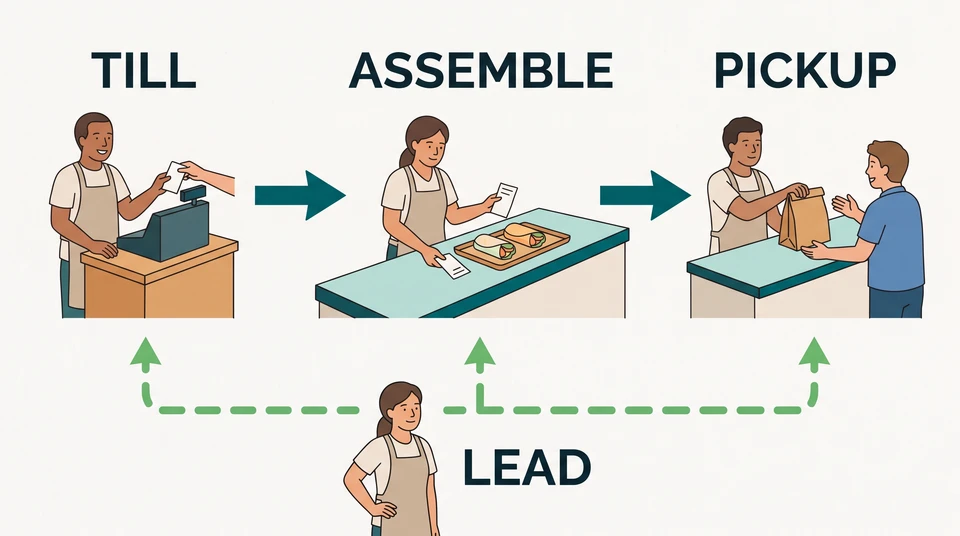
Before you advertise for a crew member, decide which part of the counter they will own. Taking an order, assembling it and handing it to the customer are different responsibilities. Write down the main job, the backup work and who steps in when the two collide.
Start in a document you already use. You do not need new software to make the role clear.
Map counter and order-assembly work
US O*NET includes taking orders, handling payments and packing food in fast-food and counter work. Treat those tasks as a starting list, not a requirement that every new starter cover every station.
Walk through one order at your venue. Where is it recorded? Who brings the items together? Who checks which customer should receive it? Mark where responsibility changes hands, including orders that are missing something.
Imagine a small US lunch counter with a till, an assembly bench and a pickup point. For this example, an experienced colleague takes orders, another assembles them, and the new crew member starts at pickup with a trainer alongside. A shift lead arranges cover and handles questions outside the crew’s agreed authority.
These are responsibilities to assign, not a recommended headcount. Your menu, service layout, other work and training needs decide how many people you need.
Use this role-boundary sketch as a starting point:
| Work area | Main responsibility | When to ask for help |
|---|---|---|
| Till | Record the order and payment, then pass clear order details to assembly. | An order correction or payment question is outside the worker’s agreed authority. |
| Assembly | Match the order details to the items and pass the order to pickup. | An item is missing, unclear or not ready. |
| Pickup | Match the order identifier to the customer and keep track of orders still waiting. | The customer reports a missing item or the order cannot be matched. |
For this new hire, underline pickup as the primary duty. Put the trainer’s name beside it. Keep any food preparation, specialist equipment or other work outside the role until you have separately defined the task and preparation needed.
Distinguish primary and backup duties
Give the crew member one clear starting point: stay responsible for pickup unless the shift lead confirms a change. Avoid “help everywhere as needed” as the whole job description.
Then name a specific backup task. In this example, the new starter might later help match wrapped items to an order at assembly, after supervised practice and a manager check. That is a task to learn, not a skill you can assume on their first shift.
Set a cover rule before the lunch rush:
If assembly needs help, ask the shift lead first. Move only after someone confirms they have pickup covered.
Suppose an assembly colleague asks the new starter to help while a customer is waiting at pickup. The starter stays with the customer and calls the lead. The lead decides whether to provide assembly help, take pickup themselves or keep everyone on their current job. The starter does not quietly leave the collection point.
If the same person owns till and pickup during a quieter period, write down which task takes priority when a new order and a collection arrive together. Try the arrangement with a practice order. If neither responsibility can get the attention it needs, change the allocation before using it in service.
Name an alternative contact when the lead is unavailable. Agree who can authorize order changes and refunds; do not leave the new starter to guess. Assigning stations and dealing with service complaints sit within US O*NET’s food-service supervisory work, but your manager still needs to set the venue’s decision limits.
State job-related requirements
Split your role notes into what the person needs to bring and what you will teach. Keep both tied to the work you have actually assigned.
For this pickup-first example, the manager could ask for someone who can follow order identifiers, communicate clearly with customers and colleagues, and ask for help when an order does not match. Put the actual shift pattern in the advertisement and ask candidates to discuss their availability.
List your till steps, menu shorthand, pickup routine and assembly checks as training topics where you intend to teach them. Do not make prior experience at every station a blanket requirement for a role that starts at pickup.
If you believe a particular skill is essential from the start, name the task behind it. “Confident using our till without supervision” describes a different starting role from “learn our till process with a trainer.” Decide which one you are hiring for before you advertise.
Here is a role summary to adapt:
Counter crew member, starting at pickup. Match ready orders to customers, track orders waiting for collection and raise missing-item questions with the shift lead. Learn our order flow with a trainer. Assembly backup follows supervised practice and a manager check, with pickup cover agreed before you move.
Add the duties and shift details that genuinely apply to your venue. Remove anything you cannot explain, teach or provide cover for. This is an operating outline, not a complete employment document or a substitute for your local requirements.
Prepare supervised training
Give the first-shift trainer the same role summary used in hiring. Ask them to prepare a practice order, show the pickup routine, then watch the new starter try it. Include a missing-item question and a request to help at assembly: the starter should know who to contact, not improvise an answer.
Record what they can do independently and what still needs support. For example: “Pickup routine practised with trainer; assembly backup not yet checked.” Give that note to the person assigning the next shift. A job title alone should not be your signal that someone is ready for every station.
After service, ask the starter and trainer where ownership was unclear. If both thought someone else was following up a waiting order, change that part of the role note before the next shift.
Carry the role into the next shift
Keep the primary duty, planned training and cover contact together as you move from hiring to onboarding. CrewCentral Hiring organizes candidates around roles and carries the person you choose into onboarding. Your team reviews candidates and makes the hiring decisions; CrewCentral does not screen them for you.
Use the role note to connect the hiring conversation, first-shift setup, training and schedule. CrewCentral Training tracks role-based steps and manager sign-offs, so review that progress before assigning work the person has not covered alone. Check which features are available in your workspace before relying on them.
For a free starting point, keep the role note in your existing document and try the free schedule maker to plan who covers the shift. It is manual, saves the draft in your browser and needs no account or email to start. It does not generate an AI schedule or provide the shared team workspace. Account-based AI schedule drafts still need manager review before publishing.
Before posting the vacancy, finish one sentence: “This crew member owns ___, can back up ___ after preparation, and asks ___ before leaving their station.” If you cannot fill it in, settle the role boundary first.