Resolve restaurant scheduling conflicts without creating another one
Before moving someone into dinner service, trace their existing work, compare the alternatives and keep any unresolved gap visible.
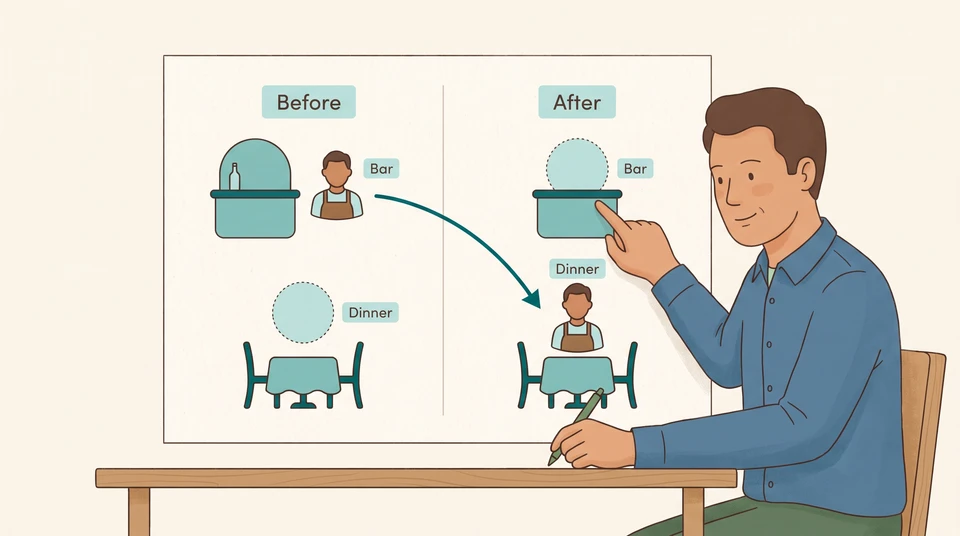
Before you move someone into an empty dinner shift, check the work they would leave behind. Write down both assignments, their times and who would cover each one after the move. If the second answer is blank, keep that gap in the decision.
The useful question isn’t just “Who can take this shift?” It’s “What happens to their other work if they do?”
Identify the exact conflict
Start with the person, date, role and full shift times. A scheduling conflict can mean assigning someone two responsibilities at once, or assigning them work when they aren’t available. Sling’s scheduling-conflict guide describes these distinctions.
CrewCentral scheduling alerts managers to scheduling conflicts, and the free schedule builder provides conflict alerts too. Someone on leave is clearly marked in the employee-focused view; the role-based view shows “(Unavailable)”.
Use a conflict alert or an “(Unavailable)” indication as your cue to check the affected date and full shift times. Confirm the person’s availability, role readiness and other assignments before deciding what to change. Then trace the work any replacement would leave behind.
For the change you’re considering, make a short note:
- Which responsibility needs cover, and for what exact period?
- Who is proposed to take it?
- What are they already assigned to do during that period?
- Who would take over the work they leave?
Check the person’s other responsibilities, not just the empty shift. Include any prep or closing work that would compete for the same time. For overnight shifts, include the dates on both sides of midnight.
Separate availability from assignment
Ask the proposed replacement to confirm the hours they can actually work. Then check whether they’re ready to handle the role independently and whether they already have another assignment.
Keep those answers separate. “Available until 10pm” doesn’t answer “Who covers their bar shift?” Nor should a new hire’s start date stand in for completed onboarding or role training. Ask the manager responsible for that preparation what the person is ready to do before counting them as cover.
Before settling a changed shift, check the rules and employment arrangements that apply to your venue. If you’re unsure whether the change is permitted or requires agreement, get that answer before treating the option as settled.
Example: moving Alex to dinner
Suppose you manage a small restaurant with these Friday assignments:
- Alex is assigned to the bar from 5pm to 9pm.
- Dinner service needs someone from 6pm to 10pm.
- Alex has confirmed availability from 5pm to 10pm and is ready to work either role independently.
For this example, assume each responsibility needs one person throughout its stated hours, and one person cannot do both at once. Compare each option against those same needs.
Compare what each fix leaves behind
Add dinner without removing the bar assignment
Alex would have two assignments from 6pm to 9pm: three hours of overlap. Both rows would have a name, but Alex would still be expected in two places at once.
Reject this option unless you can make a genuinely different service plan. Don’t count the same person twice.
Move Alex completely to dinner
Dinner would have cover from 6pm to 10pm. The bar would now have nobody assigned from 5pm to 9pm.
That moves a four-hour gap rather than removing it. Name the bar gap explicitly before considering this a solution.
Keep Alex on the bar and arrange late dinner cover
Suppose another dinner-ready person confirms they can work from 8pm to 10pm, with no competing assignment. That offers two hours of dinner cover, but leaves 6pm to 8pm unresolved.
Record both parts: who covers the later hours and who, if anyone, can cover the earlier ones. Don’t describe the whole dinner shift as covered.
Move Alex only after confirming bar cover
Suppose Sam is independently ready to work the bar, confirms availability from 5pm to 9pm, has no other assignment and is permitted to take the shift. The proposed assignments would then be:
- Sam on the bar, 5pm to 9pm.
- Alex on dinner, 6pm to 10pm.
Under those assumptions, each example responsibility has a different person for its full hours. Before choosing it, check Sam’s full assignments too. If Sam was already needed for prep, add that vacated work to the comparison rather than stopping at the bar.
If none of the options works
Keep the unresolved role and hours visible. For example: “Dinner: no confirmed cover, Friday 6pm–8pm.”
Take that specific gap to the owner or manager who can decide the service plan. Ask what work can be changed, reduced or deferred, and who has authority to make that decision. Don’t treat an unanswered availability request or unfinished training as the missing cover.
Confirm one current decision
Once you’ve chosen a workable option, update the schedule you use with the team. Remove superseded assignments and check the resulting coverage again, including any work the replacements have left.
Tell each affected person their date, role, start and finish times, and which earlier assignment the decision replaces. Ask them to acknowledge receipt. Keep that acknowledgement separate from confirmation that they can work the hours or any agreement you need for the change.
A short decision note can help:
“Friday: Sam on bar, 5pm–9pm; Alex on dinner, 6pm–10pm. This replaces Alex’s bar assignment. Manager: check the updated assignments and follow up with each person.”
For your next change, use the same test: check the new assignment, trace the work left behind, then confirm the decision. If a gap remains, leave it named and owned—not hidden by a moved name.