Hire

Hiring

Onboard

Onboarding

Train

Training

Schedule

Scheduling

Built for

Shift-based teams RestaurantsCafesBars

Resources

Learn

GuidesBlog

Company

Product overview About Contact
Get started for free Login
Scheduling

Build the week with your whole team in mind.

Put roles, availability, and regular shifts together before you start moving names around. CrewCentral gives managers a draft they can review, adjust, and publish when the week is ready.

What you can do

Scheduling, made for the real workday

  • Set up roles and shift patterns for the week
  • Plan around availability and time off
  • Create a draft schedule to review and adjust
  • Make changes before sharing shifts with your team
How it works

A clearer way to get it done

1

Draft the week

Choose the week, set up roles, and check planned coverage before you share the schedule with the team.

2

Check the details

Check availability, role fit, hours, double bookings, and rest gaps before the schedule goes out. Managers make the final call.

3

Share the finished schedule

When the schedule looks right, publish it in CrewCentral. The free schedule maker is for drafting, printing, downloading, and sharing by link.

Inside CrewCentral

The details you need in one place

  • Set up roles and shift patterns for the week
  • Plan around availability and time off
  • Create a draft schedule to review and adjust
  • Make changes before sharing shifts with your team
  • Send email updates when notifications are set up
  • Give team members a private calendar for their shifts
Works better together

One team, from first hello to next week's roster.

Hiring, onboarding, training, and scheduling share the same team context, so managers can see the information they need when planning the week.

Explore the platform →
Try it first

Make your first schedule for free

Make a weekly restaurant, cafe, or bar schedule. Adjust the shifts, print or download the week, and reuse it next time. No account needed.

Open restaurant schedule maker
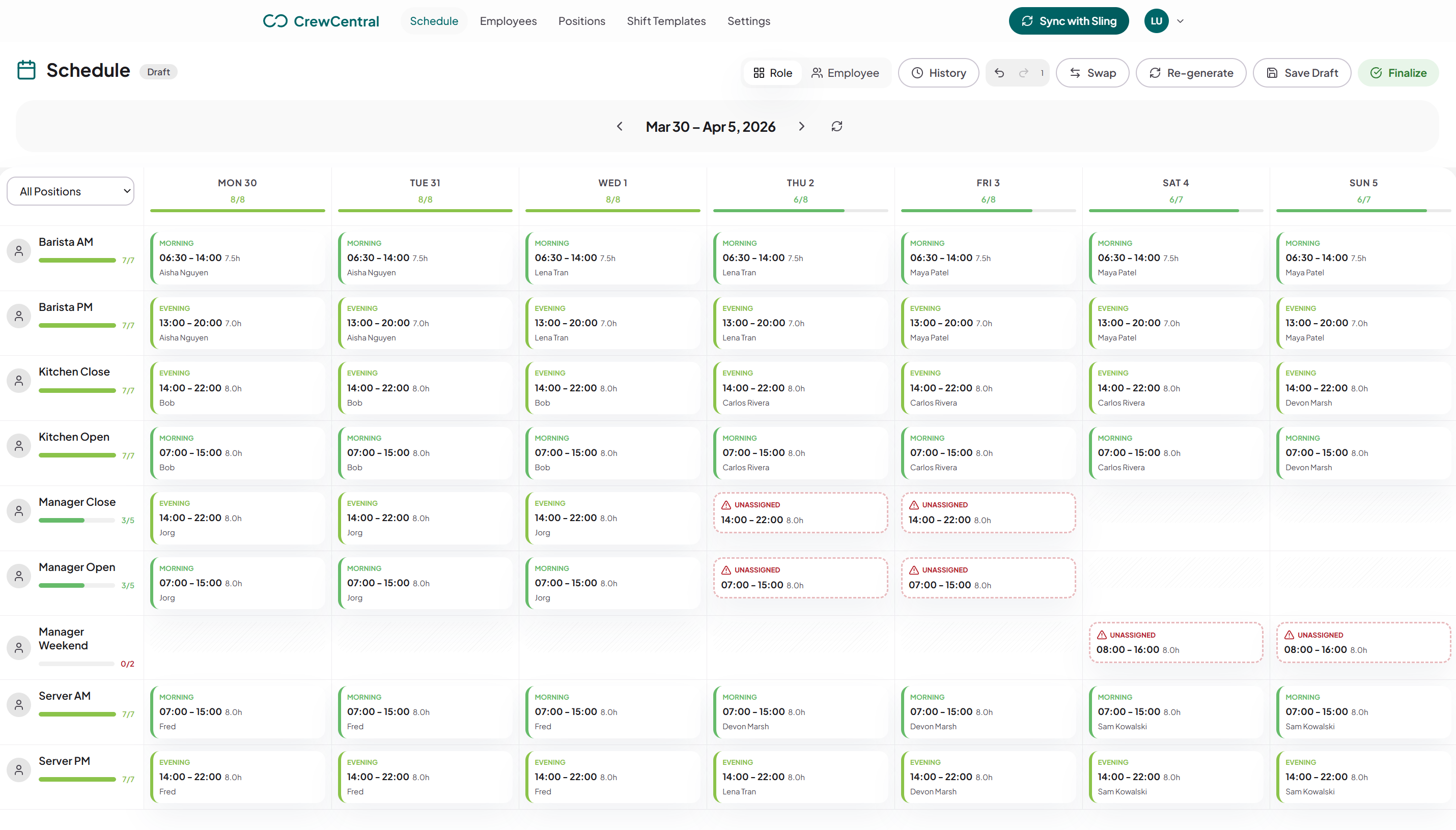
Example weekly schedule: weekly shifts organized by role in the CrewCentral scheduling workspace
Connected by design

Keep team details close to the work

Your team's roles, availability, progress, and readiness are easier to use when they live together.

Team details

Keep each person’s roles, availability, onboarding progress, and training steps together so managers can plan with the full picture.

Availability and time off

Recurring availability and time-off inputs feed the draft before a manager starts moving shifts around, so coverage gaps show up during planning instead of on the day.

Roles and shift templates

Set up the roles and shift patterns your team uses, then reuse that structure every week instead of rebuilding a grid.

Manager review before publishing

Start with a draft, make changes, and give the week a final check before the schedule goes out.

Schedule delivery

When email updates are set up, let team members know the schedule is ready. Each person can also see their shifts in a private calendar.

Team workspace

Keep your team, schedules, and training progress in one place so the details are there when you need them.

Scheduling questions

Frequently asked questions

Can I try scheduling before creating an account?

Yes. The schedule maker gives you a full editable week in the browser with no account. It covers drafting, editing, printing, CSV export, and reusing next week.

Does the schedule maker notify my team?

No. It produces a draft you can print, export, or share by link. Finalizing and notifying happens inside the CrewCentral workspace once a schedule is published and notifications are configured.

What does the app do that the free tool does not?

CrewCentral keeps your team’s roles, shift patterns, availability, and time off together. Managers can review schedules before publishing, send email updates when set up, and give each person a private shift calendar.

Does scheduling check labor law for me?

CrewCentral helps you spot availability conflicts, double bookings, and short rest gaps. You still need to check local labor rules yourself.